The Linux ls Command
Part one in the Linux Command Series
Published on May 23, 2026 by Mike Chilson
Commands Bash Linux Tutorial
4 min READ
Introduction
The ls command is one of the most fundamental and frequently used commands in Linux and Unix-like operating systems. It stands for “list” and is used to display the contents of a directory. This tutorial covers basic usage, advanced options, and professional tips for mastering ls.
Basic Use of the ls Command
Listing Files and Directories
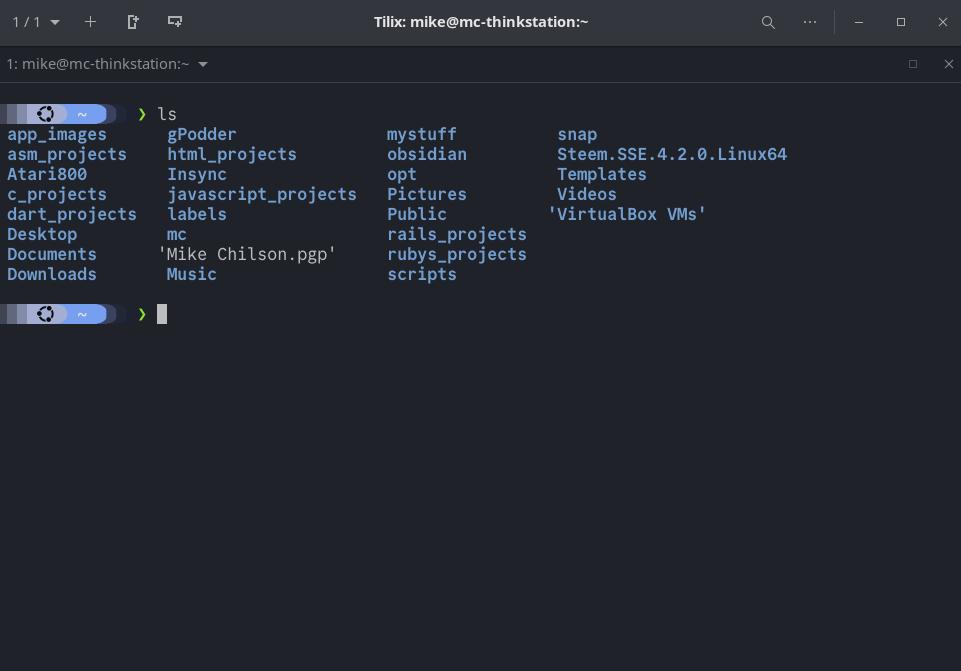
- To list the contents of the current directory in the terminal, type:
ls - This shows files and directories in a simple columnar format.
Listing with Details
- Use the
-loption for a long listing format that includes permissions, owner, size, and modification time:ls -l
Listing Hidden Files
- Hidden files start with a dot (
.). Use the-aoption to show them:ls -a - Note: You can combine options like this:
ls -laorls -al
Listing Specific Directory
- To list contents of a specific directory:
ls /path/to/directory - Example:
ls /home/user/Documents
Human-Readable Sizes
- Use
-hwith-lto show file sizes in human-readable format (KB, MB, etc.):ls -lh
Using Wildcards
Wildcards are powerful pattern-matching tools that allow you to list directories and files selectively without typing every name. They are especially useful when working with large directories or groups of files.
| Wildcard | Description | Example |
|---|---|---|
* | Matches any number of characters | ls *.txt |
? | Matches exactly one character | ls report?.pdf |
[] | Matches any character in the set | ls file[1-5].txt |
Advanced Uses of the ls Command
Sorting Options
- Sort by size (largest first):
ls -lS - Sort by modification time (newest first):
ls -lt - Reverse sort: Add
-r, e.g., `ls -ltr (oldest first)
Recursive Listing
- List contents of directories recursively:
ls -R
File Type Indicators
- Show file types with symbols (/ for directories, * for executables):
ls -F
Colorized Output
- Many systems have color support enabled by default. If not:
ls --color=auto - NOTE: many modern distros alias
lstols --color=auto
Ignoring Patterns
- Ignore files matching a pattern:
ls --ignore=\*.tmp
Combining Options
- Common powerful combination:
ls -lathrThis shows all files (-a), long format (-l), human-readable sizes (-h), sorted by time (-t), reversed (-r)
Pro Tips: Advanced Tips and Tricks
Setting Default ls Behavior in Login Scripts
- You can create an alias in your shell configuration file to make ls behave differently by default.
- For example, Bash users, edit ~/.bashrc or ~/.bash_profile:
alias ls='ls --color=auto -h'(can be ls with any parameters) - For more advanced defaults:
alias ll='ls -lh'oralias la='ls -lah' - After editing, reload with:
source ~/.bashrc
Piping ls Output to Other Commands
- The
|symbol connects the standard output (stdout) of the left command to the standard input (stdin) of the right command. This enables powerful command chaining without saving intermediate results to files.
Examples with grep
- List only files containing “report” in their name:
ls | grep report - Case-insensitive search:
ls | grep -i report - Show detailed list of .txt files:
ls -l | grep '\.txt$' - Other Useful Pipes
- Count files in directory:
ls | wc -l - Find largest files:
ls -lS | head -n 10 - Paginate long output:
ls -l | less
- Count files in directory:
Additional Pro Tips
- Use
ls -1to list one file per line (useful for scripting). - For inode numbers:
ls -i - Show full paths with tree alternative or find, but ls can combine:
ls -d $PWD/\* - In scripts, always quote variables when using ls to handle spaces:
ls "$DIR" - Performance note: For very large directories, consider using
findinstead ofls -R
Conclusion
Mastering the ls command significantly improves your efficiency on the Linux command line. Practice these options in your terminal to become comfortable with them. Combine ls with other commands using pipes for even more powerful workflows. Don’t forget, all this information can be found in the ls man page man ls.
Stay tuned for more tutorials.