MarkLite Markdown Viewer/Editor Version 1.0.1 Released
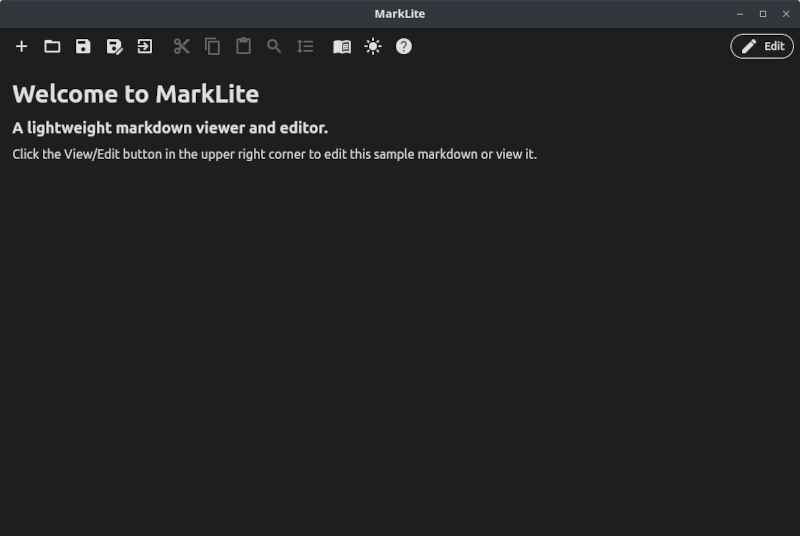
Open Source Lightweight Markdown Viewer/Editor for Linux and Windows
Published on June 19, 2026 by Mike Chilson
Open Source Markdown Viewer Editor Programming Utilities Linux Windows
1 min READ
MarkLite version 1.0.1 is a maintenance release. Changes include being recompiled with the latest Dart, Flutter, and library dependencies, and slight rework of the code that shuts down the program when you exit to make it more streamline.
MarkLite is an open-source, lightweight Markdown Viewer and Editor for Linux and Windows. I wrote MarkLite out of frustration for having to load a feature-heavy Markdown editor to just view or make a quick change. I developed MarkLite in Dart/Flutter and it was one of my first attempts to write a platform application in that language/framework combination.
Overview
Basically the way MarkLite works is it opens in a viewer mode (you can set it as your default MarkDown viewer by right clicking on a .md file and choosing MarkLite there). You can either read the Markdown document then close it or simply click the Edit button to edit it. Edit mode is a full features edit with features like Find, Goto Line, Line Numbers, Syntax Highlighting and Key Commands.
Features
- Lightweight application that loads fast.
- Can be set as your default viewer for Markdown files.
- Viewer/Editor modes.
- Offers a light and dark mode.
- Button to online markdown reference
- Editor has basic functionality for quick edits.
- Common keyboard shortcuts in editor.
- Find/Replace in editor.
- GoTo Line feature in editor.
- Line numbering in editor for convenience.
- Reference button points to a Markdown reference website in your browser.
- Markdown syntax highlighting in editor.
MarkLite is currently available on Linux in .deb, .rpm, and snap packages. Now available in a Windows version also.
Final Thoughts
Remember that MarkLite is a lightweight viewer/editor and does not have the full editor/IDE dynamic syntax analysis and other features. This application is focused on being a fast viewer with light editing, not a feature rich editor.
You can read more or download the package, snap or installer at the MarkLite website.